Zero-downtime deployments on a $15/month server
How I kept Wattlog.pro alive during updates without Kubernetes, load balancers, or a second server bill.
The problem
Wattlog is a training app for cyclists. Users pair their smart trainers over Bluetooth and run workouts that can last two hours or more. A server restart mid-ride doesn't just break the session — it breaks the user's trust.
The naive fix is to never restart. The real fix is to restart safely.
I didn't want to pay for Kubernetes or a fleet of EC2 instances. I wanted the problem solved on a single t3.small ($15/month). Here's how I did it.
Table of Contents
- 1. Redis for session state
- 2. PostgreSQL as the fallback
- 3. resume_url + client_id
- 4. Two containers behind Nginx
- 5. Bcrypt outside the DB pool
- 6. Results
1. Redis for session state
The key insight: if the active workout lives in the app's memory, any restart loses it. So I moved it out.
Every active workout session is persisted to Redis the moment it's created and updated continuously as the user pedals. When the API restarts, it reconnects to Redis and the session is exactly where it was.
User starts workout
  → API creates session object
  → API writes session to Redis (key: session:{client_id})
  → API handles WebSocket events, updates Redis on every state change

API restarts
  → New API process starts
  → Reads session back from Redis
  → User reconnects, session resumes
Redis becomes the source of truth for in-flight sessions. The API is stateless.
2. PostgreSQL as the fallback
Redis is a cache, not a database. I treat it like one.
If Redis is unavailable at startup — crashed, evicted, whatever — the API loads the session state from PostgreSQL. Everything that matters is also written to Postgres asynchronously.
This means:
- Redis failure → API still works, slightly slower
- Redis + Postgres failure → users see an error (this is acceptable)
- Redis failure mid-session → session falls back to last Postgres checkpoint
No single point of failure for sessions.
3. resume_url + client_id
Each session gets two things:
client_id— a stable UUID tied to the user's deviceresume_url— a URL the client can call to reconnect to an existing session
When the WebSocket drops (network blip, API restart, browser tab refresh), the client hits the resume_url and gets back exactly where it was — same workout, same elapsed time, same power targets.
The client doesn't know or care that the API restarted. It just reconnects.
4. Two containers behind Nginx
I run two identical API containers on the same server. Nginx sits in front of both.
The deployment sequence:
1. Restart container A  →  Nginx routes all traffic to container B
2. Container A is healthy  →  Nginx balances across A and B again
3. Restart container B  →  Nginx routes all traffic to container A
4. Done. Zero downtime.
WebSocket connections need sticky sessions — a client mid-workout can't be shuffled between containers. Nginx handles this with cookie-based routing:
upstream api {
    ip_hash;
    server api_a:3000;
    server api_b:3000;
}
Each WebSocket connection stays pinned to the same container for its lifetime. If that container goes down during a planned restart, the Redis-backed session state means the client reconnects to the other container without losing data.
5. Bcrypt outside the DB pool
This one surprised me.
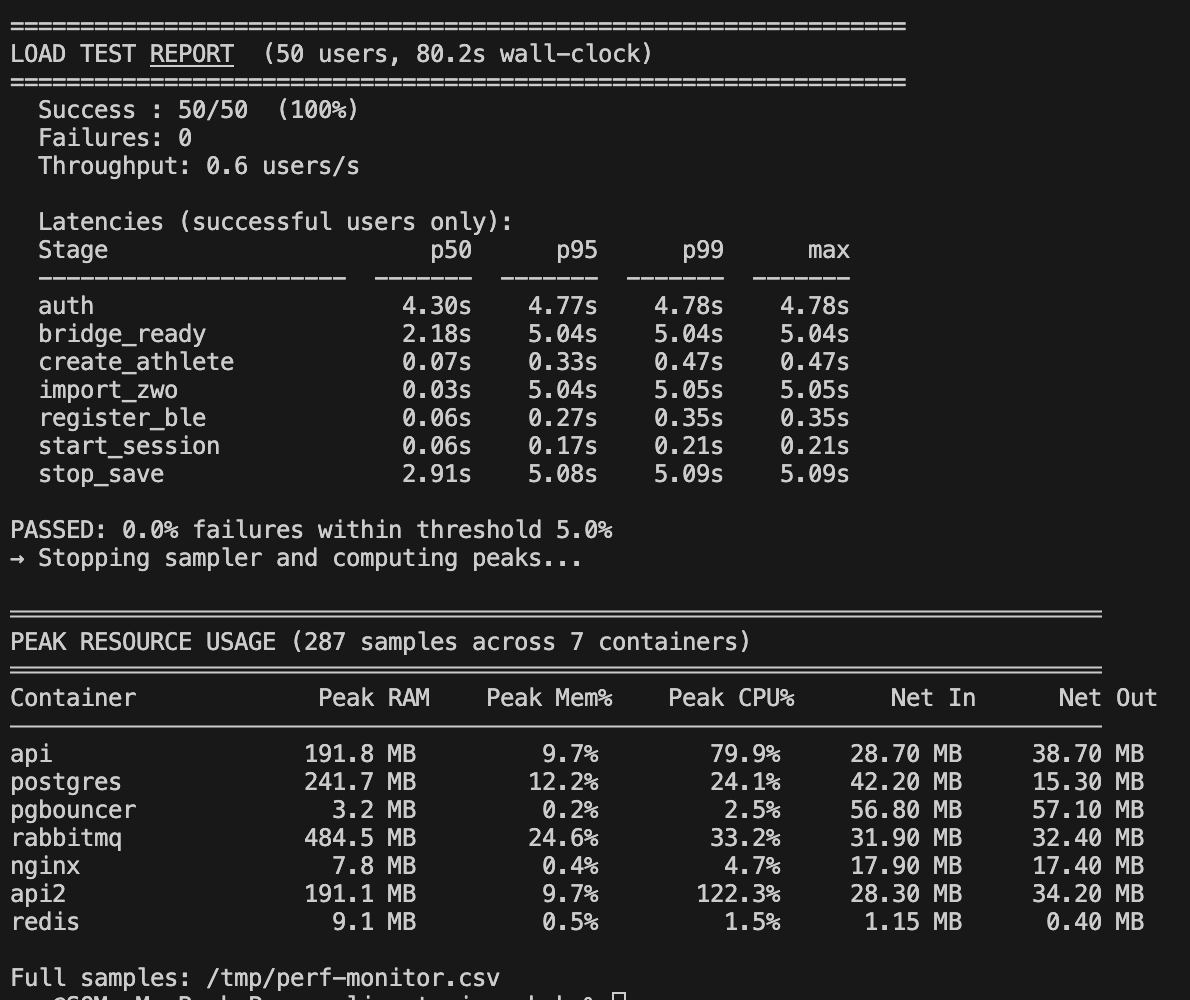
During load testing I noticed login requests were timing out under concurrent load. Profiling showed the culprit: bcrypt was running while holding a database connection open.
Bcrypt is intentionally slow — it's designed to be CPU-intensive to resist brute-force attacks. On 2 vCPUs, a single bcrypt verify takes about 2.5 seconds. With a small DB connection pool, a handful of concurrent logins would exhaust the pool while bcrypt churned away.
The fix was trivial: release the DB connection before running bcrypt, reacquire it after.
Before: acquire DB connection → fetch user → verify bcrypt → update last_login → release
After:  acquire DB connection → fetch user → release → verify bcrypt → acquire → update last_login → release
Test success rate under concurrent load: 78% → 100%.
6. Results
| Metric | Value |
|---|---|
| Server | t3.small (2 vCPU, 2 GB RAM) |
| Monthly cost | ~$15 |
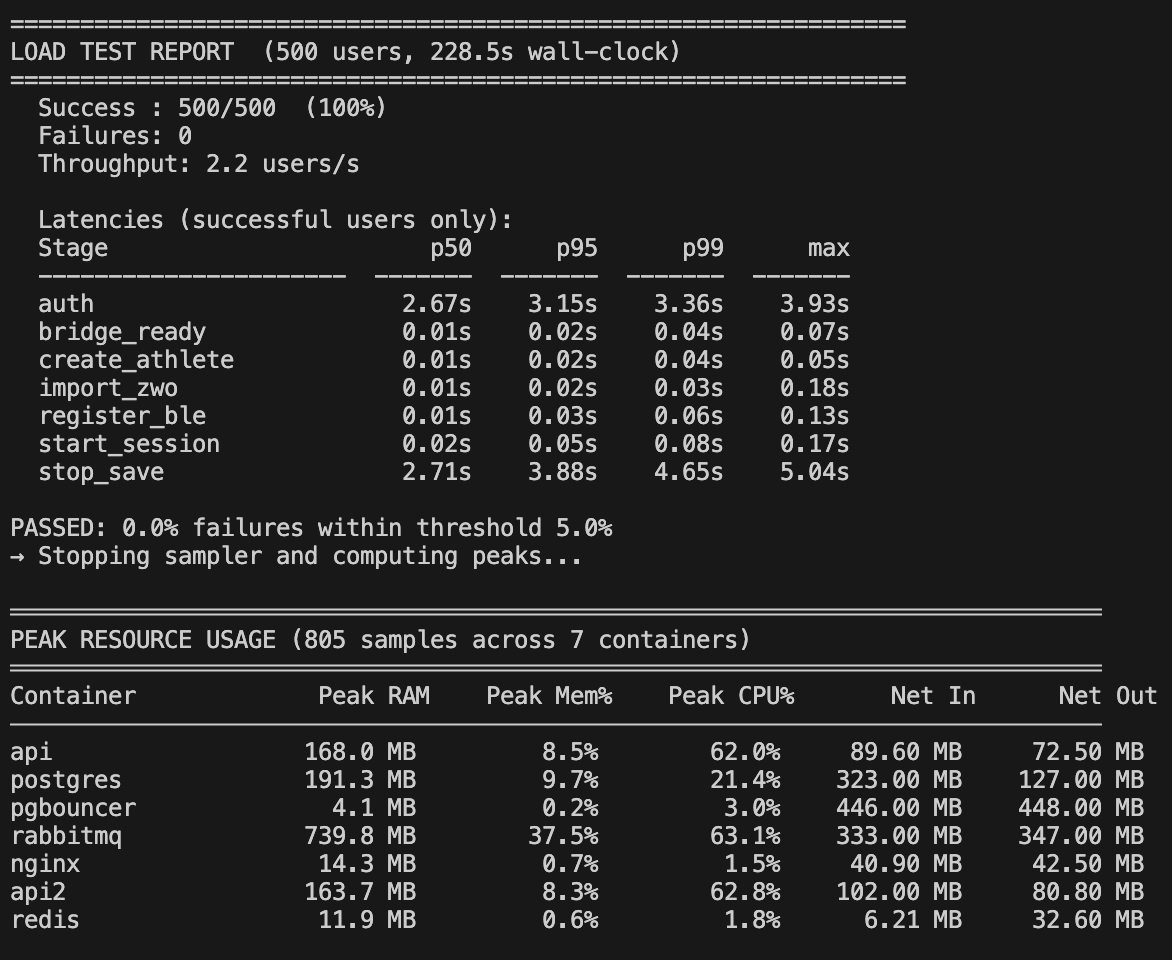
| Concurrent logins handled | ~50 (bcrypt is the ceiling) |
| Load test users | 500 |
| Deployment downtime | 0 |
| Session loss on restart | 0 |
The bcrypt bottleneck is honest: on 2 vCPUs, you can hash about 50 passwords simultaneously before you saturate the CPU. That's fine for a training app. If Wattlog ever needs to handle login spikes at that scale, the fix is either a dedicated auth service or a bcrypt work factor reduction — not a bigger server.
Everything else scales fine. Redis is fast, Postgres handles the persistence load, and the two-container setup means I can deploy any time without coordinating with users.
What I'd do differently
Horizontal scaling is not the first answer. The problems I hit — stateful sessions, bcrypt blocking, WebSocket affinity — were all solvable without adding servers. Adding servers before solving these would have just spread the problems around.
Measure before optimising. The bcrypt issue was invisible until I actually ran a load test. I would have guessed the DB queries were the bottleneck. Profiling told me otherwise.
Redis as a cache, not a primary store. Treating Redis as disposable — and keeping Postgres as the authoritative source — meant I never had to worry about Redis durability or backup. If it dies, it dies. The data is safe.
Tags: #systemdesign #backend #buildinpublic #redis #nginx #websockets